
Download Wordplus – AI Writing Assistant, Content Creation, Plagiarism Checker
Overview
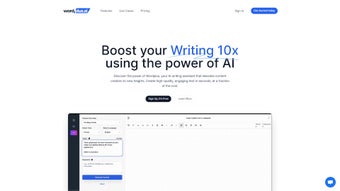
Wordplus.ai is a comprehensive AI‑powered writing assistant that aims to transform the way individuals and businesses generate written content. Built on advanced natural language processing models, Wordplus delivers a seamless blend of creativity, speed, and accuracy, making it suitable for everything from long‑form blog posts to bite‑sized social media captions. The platform’s core promise is to cut down the time spent on drafting, editing, and proofreading while guaranteeing originality through an integrated plagiarism detection engine.
With support for more than 30 languages, users can effortlessly translate their work, ensuring global reach without compromising tone or nuance. Moreover, Wordplus offers a rich text editor that mimics familiar desktop word processors, allowing writers to format, style, and reorganize text with a click. Its subscription model provides unlimited word count and unlimited projects, removing the typical per‑word pricing constraints found in many competing tools.
Whether you are a freelance copywriter juggling multiple clients, a marketer needing rapid ad copy variations, or a student looking for a reliable research assistant, Wordplus positions itself as a one‑stop solution that combines the flexibility of a multi‑purpose content generator with the reliability of a professional editing suite. The combination of smart formatting, tone customization, and real‑time language translation makes it a standout option in the crowded AI‑writing market, especially for users who demand both creativity and compliance with SEO best practices.
Key Features That Set Wordplus Apart
- AI Content Generator: Generates blog articles, social media posts, email drafts, and ad copy in seconds, using context‑aware language models.
- Smart Formatting: Automatic heading hierarchy, bullet‑point creation, and table insertion to keep documents clean and SEO‑friendly.
- 30+ Language Translation: Seamlessly translate content into over thirty languages while preserving the original voice and nuance.
- Robust Plagiarism Checker: Scans text against billions of web pages to ensure 100 % originality, complete with detailed similarity reports.
- Voice & Tone Library: Choose from more than 30 preset tones—such as professional, conversational, witty, or persuasive—or craft a custom tone profile.
- Rich Text Editor: A desktop‑like editing environment with drag‑and‑drop image support, markdown shortcuts, and real‑time spell‑check.
- Unlimited Words & Projects: One flat‑rate subscription removes per‑word limits, enabling unlimited content creation.
- Collaboration Tools: Share drafts with teammates, leave comments, and track revision history for efficient workflow.
- Fast, Reliable Support: 24/7 live chat and email assistance, plus an extensive knowledge base and tutorial videos.
- Secure Cloud Storage: End‑to‑end encryption keeps your drafts safe, with automatic backups and GDPR compliance.
Installation & Usage Instructions
Getting Started on Windows
Wordplus is available as a lightweight desktop client for Windows 10 and later. Download the installer from the official website, run the .exe file, and follow the on‑screen prompts. The setup wizard automatically adds a shortcut to your Start menu and configures the app to launch at login if you prefer. Once installed, sign in with your subscription credentials, and you’ll be greeted by the main dashboard where you can start a new project or import existing drafts. The Windows version leverages native OS acceleration for faster AI inference, ensuring rapid content generation even on modest hardware.
Running Wordplus on macOS
Mac users can download a .dmg package, drag the Wordplus icon into the Applications folder, and launch the app from Launchpad. The macOS client is fully optimized for Apple Silicon and Intel chips, offering seamless integration with macOS features like Spotlight search and Dark Mode. After signing in, you can sync your projects across devices using the built‑in cloud service, making it easy to continue writing whether you’re on a MacBook or an iMac.
Using Wordplus on Android & iOS
For mobile creators, Wordplus offers native apps on both Android (Google Play) and iOS (App Store). Install the app, log in, and you’ll have full access to the AI generator, translation tools, and plagiarism checker—all optimized for touch interfaces. The mobile apps support offline drafting; however, AI generation and plagiarism checks require an internet connection. Voice input is also supported on mobile, allowing you to dictate content directly into the editor.
Compatibility Overview
Wordplus is compatible with Windows 10/11, macOS 10.15 (Catalina) and newer, Android 7.0+, and iOS 13+. The web version runs in any modern browser (Chrome, Edge, Firefox, Safari) without the need for additional plugins, offering a universal fallback for users on less common operating systems.
Step‑by‑Step Workflow
- Log in to your account using your email and password or single sign‑on (SSO) options.
- Select “Create New Project” and choose a template (blog post, email, ad copy, etc.).
- Enter a brief brief—topic, target audience, desired word count, and preferred tone.
- Click “Generate” and let the AI produce a first draft within seconds.
- Use the rich text editor to fine‑tune formatting, insert media, and adjust headings.
- Run the built‑in plagiarism checker to verify originality.
- Translate the final copy into any of the supported languages with a single click.
- Export the document as a PDF, DOCX, or directly publish to your CMS via the integration panel.
Following this workflow, users typically reduce their content creation time by 60‑80 %, freeing up resources for strategy and distribution.
Pros and Cons
Pros
- Unlimited word count and projects under a single subscription.
- Integrated plagiarism detection eliminates the need for third‑party tools.
- 30+ language support and real‑time translation broaden audience reach.
- Extensive tone library lets you match brand voice precisely.
- Cross‑platform availability ensures seamless switching between desktop and mobile.
- Fast AI generation thanks to optimized cloud infrastructure.
- Robust collaboration features for teams and agencies.
- Secure, encrypted cloud storage compliant with GDPR and CCPA.
Cons
- Requires an active internet connection for AI generation and plagiarism checks.
- Pricing is subscription‑based, which may be a barrier for occasional users.
- Advanced features (custom tone creation) are locked behind higher‑tier plans.
- Learning curve for new users unfamiliar with AI‑driven writing tools.
- Limited offline capabilities compared to traditional desktop word processors.
Frequently Asked Questions
Is Wordplus free to try?
Wordplus offers a 7‑day free trial with full access to all features, allowing you to test the AI generator, plagiarism checker, and translation tools before committing to a paid plan.
Can I use Wordplus for academic writing?
Yes. The built‑in plagiarism checker and citation suggestions make Wordplus suitable for essays, research papers, and dissertations. However, you should always review AI‑generated content for academic integrity and proper referencing.
How secure is my data on Wordplus?
Wordplus employs end‑to‑end encryption, regular security audits, and complies with GDPR and CCPA regulations. Your drafts are stored securely in the cloud and are never shared with third parties without your consent.
Does Wordplus integrate with my CMS or marketing tools?
Wordplus provides native integrations with popular platforms such as WordPress, HubSpot, and Mailchimp. You can publish directly from the editor or export content in formats ready for import.
What languages are supported for translation?
Wordplus currently supports translation between English and 30+ languages, including Spanish, French, German, Chinese, Japanese, Arabic, Portuguese, Russian, and many others. New languages are added regularly based on user demand.
Final Verdict & Call to Action
Wordplus stands out as a versatile, AI‑driven writing assistant that delivers on its promises of speed, originality, and multilingual capability. Its unlimited‑words subscription model, combined with a rich set of features—plagiarism detection, tone customization, and smart formatting—makes it a solid investment for anyone serious about scaling content production. While the reliance on an internet connection and subscription pricing may deter occasional hobbyists, the productivity gains for marketers, agencies, and freelance writers are undeniable. If you’re ready to accelerate your content pipeline, eliminate writer’s block, and ensure every piece you publish is both unique and SEO‑optimized, Wordplus is the tool to adopt today.
Download Wordplus now and start your free trial to experience the future of AI‑assisted writing.



.png)



